
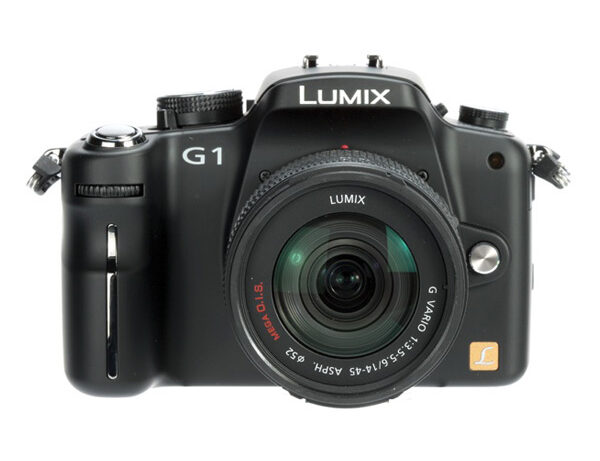

The Micro Four Thirds system will definitely have an impact on the photography world, not least the Panasonic Lumix G1. The reduction in size that the new system allows means interchangeable-lens cameras are going to get smaller, and as such will appeal to a wider audience. What?s more is that, as more models hit the market, the price of an entry-level model in the system will fall.There is no arguing that Panasonic's Lumix G1 is a very good camera. Build quality is excellent, as is the articulating LCD and LVF (aside from the minor quibbles with over-sensitive eye sensors!). Image quality is also good, with overall exposure, tone, and noise control comparable with its Four Thirds peers. However, the G1's current price tag is wildly at odds with where it sits in the camera food chain - it's currently sitting more in price-line with mid-range DSLRs, even though everything about it screams entry level, from marketing, to size and features. In time I'm sure the G1 will become a cracking proposition around the bridge camera price point, but right now it?s merely a good, but pricey, forebearer of greater things to come.
Pros

-
 3in articulating LCD, overall design and build quality, compact size
Cons

-
 Price at odds with specification, over-sensitive LVF eye sensors, image flatness
Design & Performance
Panasonic Lumix G1 review – Design

The workings of the Micro Four Thirds system mean that the Lumix G1 is noticeably more compact when placed in comparison with standard Four Thirds cameras. However, when you compare it with the smallest of all Four Thirds cameras currently available on the market, the Olympus E-420, the difference isn’t so grand, with the G1 being a few grams heavier. One noticeable difference in the respective sizes, however, is the size of a Micro Four Thirds lens, with the 6mm smaller diameter translating to a noticeable difference in size, and a lens which will no doubt handle better for those with smaller hands.
The Panasonic Lumix G1 also distinguishes itself from the DSLR market by being available in a choice of three colours – the conventional black, but also red and blue. One criticism of the colour options is that the choice of colours doesn’t extend to the lens, and as such the effect of the colour is somewhat lost.

Despite the G1’s small size, the button layout is intelligent and in general doesn’t feel too busy. The majority of camera controls are confined to the right of the Lumix G1’s top-plate. The area houses the command dial, quick menu and film mode buttons; and what’s more both the camera’s power and drive modes are controlled by two switches lying underneath the mode dial. The left of the top-plate houses a somewhat misjudged dial in my opinion, in so far as the dial in question controls the three focusing modes – single, continuous and manual focus – but no more, which raises the question as to why such a large dial and prominent feature on the camera doesn’t make the best use of the space it’s been given.
The Lumix G1 has a ‘live’ viewfinder, or electronic viewfinder as the technology is also known, which is definitely striking. Panasonic claims that it’s the best LVF/EVF ever and it’s hard to disagree. Until testing the G1 it’s difficult to say that I’ve ever used a camera with an EVF I’ve been completely happy to use. Most of the time they’re too small and don’t offer a reproduction of the scene accurate enough to use for reference. However, the EVF of the G1 is genuinely accurate and is a viable alternative to the LCD.
Panasonic Lumix G1 review – Performance
In pretty much every facet of the Panasonic G1’s performance the camera feels essentially more akin to a DSLR than a bridge camera. The continuous shooting rate of the Lumix G1 falls almost directly in line with that claimed on the camera’s specification. The model manages three frames per second on its high-speed mode and two frames per second on its low-speed mode. Buffer capacity restricts the G1 to just seven consecutive shots if Raw files are being recorded, but it’s limited only to the capacity of the card if you’re recording solely JPEG files.

It’s quite difficult to find anything inherently wrong with the performance of the G1 on the whole, though I do have a few gripes with the LVF and eye-sensor system. While it’s safe to say that the LVF is indeed the best I’ve used, there are still situations in which it is trumped by a conventional viewfinder. For example, during the test I found myself shooting in bright conditions on a beach. I had taken the Olympus E-520 out to get comparison shots between the pair of Four Thirds cameras, and when shifting between that camera’s conventional pentaprism viewfinder and the LVF of the G1, the contrast was stark. Moving from the bright shooting conditions to viewing the scene through the viewfinder made it tough to make out the LVF, much in the same way it’s tough to make out a standard LCD in the same conditions. In contrast, going from viewing the scene to looking through the conventional viewfinder of the Olympus E-520, composition was easy and the scene was as clear as day.
While on the subject of the Lumix G1’s LVF it’s fitting to mention my other gripe with the system – the eye-sensor functionality. While it’s undeniable that an eye-sensor system is a clever piece of technology and smoothes the shooting experience when shifting between LCD and LVF, Panasonic has made the eye sensors too sensitive. For example, when using the G1 for tripod work where an LCD and live view is preferable, the camera often shifted from LCD to LVF at the least opportune and unintended moment. At first I thought I had a faulty unit, unable to ascertain why the LCD was switching off, before realising that the eye sensor was detecting movement up to 15cm away from the LVF, a factor that is surely somewhat overzealous.
Panasonic Lumix G1 review pages:
- Page 1: Panasonic Lumix G1 review – Features
- Page 2: Panasonic Lumix G1 review – Design & Performance
- Page 3: Panasonic Lumix G1 review – Image Quality & Value For Money
- Page 4: Panasonic Lumix G1 specifications / specs
- Page 5: Panasonic Lumix G1 review verdict
Lumix G1 review – other What Digital Camera links:
- Compare the Lumix G1with other DSLR cameras
- Panasonic Lumix G1 review – product images
- Lumix G1 review – sample test image gallery