At low sensitivities the Canon G10's image quality is impressive, with great detail capture, accurate metering, and consistency with its Auto White Balance system. Furthermore, it is perhaps the only compact in its class whose design gives the impression that it wants to be used manually, not simply because at this price we expect some degree of manual control. My only main criticism is with the slight blandness of its JPEGs, regarding sharpening and white balance at default settings. I appreciate that Raw capture is a key concern for a compact of the G10's stature, but we should still expect a certain standard of JPEG images for more 'everyday' images. In any case this can be optimised to taste. Potential buyers may also be interested in the Panasonic LX3, which also produces high-quality images at around the same price.
Pros
Overall image quality, bright and detailed LCD screen, styling, fast operation
Cons
Bulky, poor control over fringing
Design & Performance
Canon G10 review – Design
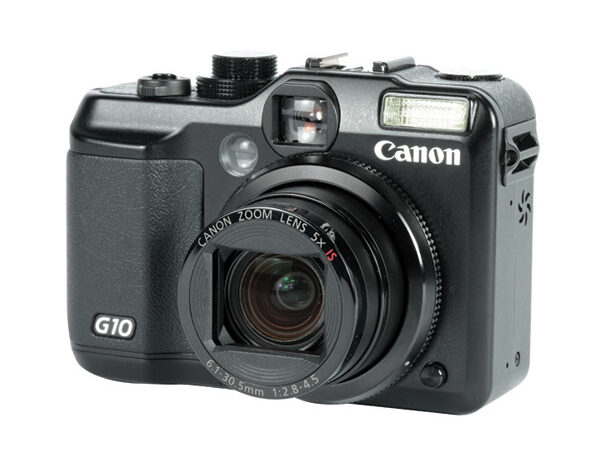
Canon’s G series has seen quite a few evolutionary changes over the course of its lifetime, beginning with vari-angle LCD screens and top-plate LCDs, eventually dropping these in favour of larger fixed LCDs and more controls on the body itself. Cosmetically, the model follows in a similar fashion to both its G7 and G9 predecessors, albeit with a few alterations.
Canon G10 review – top design
The G10’s top-plate, now plays host to three dials – one for exposure modes, one for sensitivity and one for exposure compensation – in between which sits a hotshoe.
Canon G10 review – back design
The large LCD screen dominates most of the rear, with the remainder giving way to an assortment of controls.
Advertisement
Canon G10 review – size
The G10 is both bulkier and heavier than comparable models such as the Nikon P6000, though its size does allow for a
larger screen, more controls and better stability when an external flashgun is mounted.
Canon G10 review – Performance
It takes only a second for the G10 to start up and around the same to shut down, and this speed is maintained throughout the camera’s general operation. The trio of mode dials make changing exposure modes, compensation and sensitivity a doddle, while menu options spring up promptly. The familiar L-shaped interface from Canon’s other PowerShot or Ixus offerings splits options between the Function and Menu buttons, and whatever shooting settings can’t be changed via external controls can be changed quickly via the Function button.
Canon G10 review – focusing
Focusing is generally speedy, with macro and low-light shots also focusing in good time. As with the manual exposure settings, manual focusing is carried out fairly effortlessly via the circular dial, with an enlarged portion of the view on the LCD assisting with focus.
The size and resolution of the Canon G10’s LCD screen is particularly impressive, with a clear view of the scene. Occasionally when shooting against bright sunlight, one oddity arose in that the screen would turn a vibrant shade of green or purple once focus had been confirmed. Thankfully, this problem is confined to the LCD screen and has no effect on image quality whatsoever – I imagine this may be resolved by a future firmware update.
Canon G10 review – processing times
Processing times are consistent with those for general operation; Raw files take only around a second to write to a 2GB, Class 6 SD card and JPEGs are fairly rapidly written, too.
Canon G10 review – menu options
One criticism I do have, though, is with the somewhat haphazard assortment of menu options. An example is Raw + JPEG shooting, which, rather than being located with the other file size options, is lost in the same tab as options for setting review times and for using optional converters. It’s a minor annoyance rather than any genuine matter for concern, but something you do notice when you need to access options quickly.



 Overall image quality, bright and detailed LCD screen, styling, fast operation
 Bulky, poor control over fringing