


Can you get Photoshop for free? We found out in our Free Photo Editing Software roundup.
Imaging editing and file management is an integral part of modern day photography, but the software to carry out these tasks is not always that affordable.
Although Photoshop used to be available for eye-watering amounts as an up-front payment, you could argue that having to fork out for a creative cloud subscription for years is just as expensive. At the moment you can get a Photography CC package for £8.49 a month – but can you get something which is just as good for free?
If you’d like to take more control over your images but don’t want to part with the cash involved with Photoshop then the good news is that there’s plenty of much more affordable software available that will serve much the same function. If you know where to look, you’ll also find a host of image editing programs that are completely free. Here are our picks of the best free free photo editing software and Apps for photographers…
Best free photo editing software 2016
GIMP 2.8.16
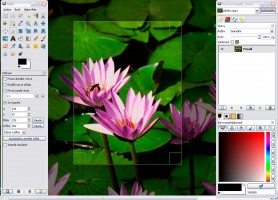
What is it?: Gimp is, in essence, a free version of Photoshop. Although it is not associated with Adobe in any way the end result is quite reminiscent of the pre-CS versions, giving a satisfyingly basic layout that may be instantly familiar to any long-standard Photoshop users.
From basic cropping and resizing to correcting barrel distortion, Gimp is an all-encompassing piece of software that offers many of the same functions that Photoshop does, but for free. For example, PSD files (Photoshop image files containing multiple layers) can be opened and altered, making it incredibly useful as a converter.
A Histogram, which can be divided in red, green and blue channels, is also present and can be utilized to alter exposure and colour balance. The interface can be moved around, adapting to the available space on your monitor, making it perfect for the likes of smaller screen laptops and desktop computers.
A clone tool, healing tool and perspective clone tool are also offered for more in-depth photo fixes, as is the ability to create and manipulate Alpha Channels and multiple layers. Because Gimp is multi-platform there’s no restrictions on using a Linux setup, nor Windows or Mac.
Gimp is a excellent solution to those not wanting to pay for Photoshop, as the functionality is extremely close to the older Adobe program from a few generations ago. Of course, it isn’t anywhere as fast or as through as Photoshop, which is to be expected really. In use you may well find that manipulating layers can be sluggish, while the chaotic floating window layout can also be a bit confusing. All of the controls are logically placed within the menus though, and there’s a number of user-made filters that can be downloaded too.
System requirements: Download – PC and Mac (additional software required)
Picasa 3.9
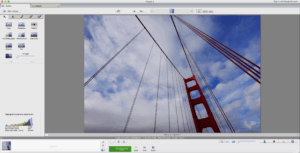
What is it?: A Google-owned photo management and editing package that you can dowload free of charge from Google. In addition to image management and basic editing, Picasa allows you to share your images via a number of Google-owned internet services and social networking platforms such as Google+. Overall, while the organisation and photo management tools of Picasa are pretty good, the editing tools are a little basic.
The editing side of things essentially boils down to a number of customizable filters, each of which comes with a few sliding controls to alter the severity of the effects. There are also a number of basic corrective settings, such as brightness and contrast, plus the ability to resize your image or save it in another file format. If you want to get a little more in-depth then you can also choose to open your images in the ‘Creative Kit’ web-based editor, which utilises a slightly cleaner interface. Be warned though: even on a superfast fibre-optic broadband connection, the Creative Kit interface can be slow.
On the plus side, Picasa allows you to import an impressive number of file formats, from JPEG to PSD along with a selection of Raw file formats. The links to Google are apparent from the get-go, with their Google+ social networking site prominent as an export option. This doesn’t mean other social networking sites are chastised though, as Twitter can be exported to directly and Facebook via a third party plugin.
The interface is relatively straightforward, with large buttons and simple icons for each function. Because the image editing aspect of Picasa isn’t particularly advanced there isn’t a massive amount of clutter either, which makes it ideal for novice users just looking to make some very basic alterations.
Unlike Gimp, Picasa is perfect for absolute beginners, as the program needs far less time spent fiddling with settings. More advanced users will probably find Picasa a bit simplistic and limited though.
System requirements: Download – PC and Mac
Paint.NET
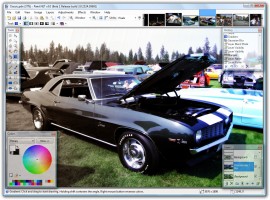
Much like Gimp, paint.NET is another old-school Photoshop clone that offers a fairly extensive array of image editing options. Originally created asan alternative to the MS Paint software that first came preinstalled withMicrosoft XP, Paint.NET has since morphed into a fully-fledged image editor in its own right. You’ll need to download the software from the Paint.NET website first and unfortunately for Mac users, Paint.NET is a Windows-only application. The source files haven’t been updated for quite some time now either, however it still remains a well put together piece of software.
Once installed, the Paint.NET interface looks remarkably similar to an older version of Adobe Photoshop complete with a number of familiar sounding drop-down menu options listed across the top of the screen, flanked by a number of equally recognisable ‘Tools’ on the left-hand-side of the screen. Navigation is, ifanything, a bit simpler than the full-fat version of Photoshop. In addition to all the usual healing, burning and cloning tools, Paint.NET also offers layer support for advanced editing, as well as more basic cropping, re-sizing and exporting options.
Overall, Paint.NET isn’t a bad image editor at all, although for our money, Gimp has a much neater looking interface. That said, if you’re running a Windows computer then Paint.NET is definitely worth a closer look – especially as both are free, you could always try both and see which you prefer.
System requirements: Windows only
RawTherapee 4
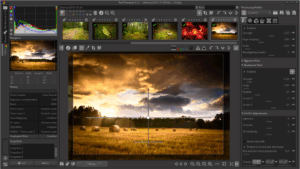
What is it?: A Raw processing program with the ability to make the kind of on-the-fly adjustments that Lightroom is capable of, from simple level changes through to tinkering with the white balance and cropping.
Looking much like a low-rent version of Lightroom the layout is very straightforward, with tools to the right, images placed centrally and the browser on the left. Moving the window to fill a larger space can cause the icons to merge into one another, showing the homemade nature of RawTherapee.
Thankfully the program churns through the majority of tasks with relative ease, making opening a number of different Raw files extremely simple. The lack of presentational flair also seems to be to the benefit of the startup and processing times, as both are impressively rapid.
Any alterations are saved within a selectable history, allowing each to be removed when needed, and viewed side-by-side with the original image. There are a few gimmicky features to play with, but the majority of controls are aimed towards correcting and tweaking rather than making huge changes.
The ability to import a whole host of files, alter them and output the results in rapid fashion will be perfect for an aspiring pro photographer on location. Pay careful attention to the build version, as some are unreliable, and take your time with the interface as a number of the tools are poorly labeled.
If you often shoot in raw and want to convert your images, this is a good place to start.
System requirements: Download – PC, Mac and Linux
Photoshop Express
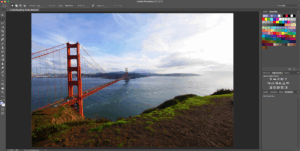
What is it?: An online version of Photoshop, albeit a stripped-down variation with more focus on organizing and sharing your images. To use Photoshop Express you’ll need to have Flash installed and the usability of the web-based software will depend heavily on your internet connection speed. That said, once you’ve uploaded the image you want to work on Photoshop Express is reasonably rapid.
The first step in the process is to upload the file or files you want to edit and how long this takes will, once again, be affected by the speed of your broadband connection. For this reason it’s worth keeping the individual files you edit below 5MB, and not uploading more than 10 at once. There’s a 2GB limit on the amount of images that can be stored, and only JPEG’s can be uploaded – Photoshop Express definitely isn’t for Raw shooters.
Once your files have been uploaded basic edits can be performed and Albums made. Rather than present you with numerical values for individual editing functions (for example, ‘Exposure’) Photoshop Express instead presents you with a series of thumbnail windows along the top of the screen that display the result of that edit in negative to positive steps; hovering your mouse over the top of each will give you an instant preview in the main image window. Once you’ve found the degree that works best for you simply click on the thumbnail to apply. From here you can choose another type of edit, or click ‘done’ to save your image back to your computer.
In addition to basic edits like Exposure and Saturation Photoshop Express also offers Dodge and Burn tools, along with cropping and resizing tools. You’ll also find a small number of digital effects filters including Pixellate and Distort along with a range of ‘Decorations’ such as speech bubbles, clip art animals and suchlike. Once you’ve finished editing your image Photoshop Express can be used to print or download your images to your computer.
Overall, Photoshop Express is a fairly straightforward web-based image editor that might prove useful if you just want to make some simple alterations, however it isn’t particularly advanced and nowhere near the level of its paid-for namesake.
System requirements: Online, Apple iOS (via the App Store) and Android (via Google Play)
PhotoPlus Starter Edition
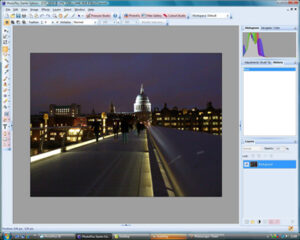
What is it?: A scaled-down version of Serif PhotoPlus, which offers the same interface with a few tools locked out. With it, you get a decent impression of how the software will work while being able to import, edit and export images.
As a result of the restricted version of the software, PhotoPlus Starter can import but only perform basic Raw file editing, misses out on HDR photo merge automation and no dedicated extension programs for fixing or cutting out images.
This doesn’t mean the functionality is removed entirely, as Serif add dedicated utilities to the full versions of the programs with altered interfaces. The likes of the clone and select tools are still very much present within the software.
Even with these restrictions Serif Photoplus Starter Edition has an impressive amount of functionality, and can adjust exposure, white balance and colour levels extremely simply. The interface is simple to negotiate, and all the controls are laid out in a manner that a Photoshop Elements-user would appreciate.
Although similar to many other demos of photo editing programs, PhotoPlus Starter Edition is far more than a simple introduction. The elements that are restricted aren’t imperative, making it well worth considering for PC users.
System requirements: PC
Pixlr
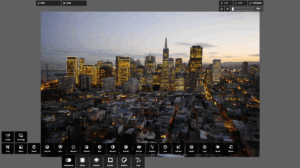
As online photo editors go, Pixlr is pretty impressive. Not only is there no sign-up involved in order to start editing, but it has much the same functionality as Photoshop Express does. The interface is reminiscent of Photoshop Elements, complete with the same drop-down Menu options along the top of the screen and the familiar Tools window to the left of the screen. Unlike some of the more basic online editors, you’ll also find that Pixlr even offers support for layers-based adjustments along with image re-sizing, filters and much more.
In addition to the basic Pixlr editor, you’ll also find the Pixlr-o-matic web app for adding retro effects and vintage filters. This is very simple to use and offer plenty of one-click digital filter effects that can be used to add interesting effects to your images with.
Additionally, there’s also Pixlr Touch Up, which is an add-on for Google’s Chrome web browser. It gives you a few basic editing options and can be used offline. There’s not a huge amount to choose from, but some useful tools if you’re in a pinch or a hurry include Crop and Rotate.
System requirements: PC or Mac, Flash required
Fotoflexer
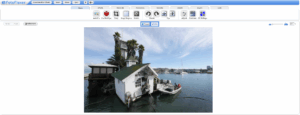
What is it?: Another web-based program, much like Photoshop Express and Pixlr, with the ability to import and edit from the likes of Facebook. Opening the page for the first time, Fotoflexer looks pretty amateurish, however stick with it and you’ll find it’s actually quite well featured. Simply follow the prompts to upload an image to the workspace and from here Fotoflexer will present you a
series of tabs running across the top with headings such as ‘Basic Edits’,
‘Effects’, ‘Decorate’ and ‘Beautify’. Our tip is to expand the workspace to full-screen mode as this cuts out the slightly intrusive adverts. From here you can click on the tabs, which in turn will give you access to the individual edits available under each. There’s no layers support and the basic edits are quite basic, however the Effects tab does contain a generous range of digital effects to play around with, making it quite a fun application for the more casual digital darkroom enthusiast.
System requirements: PC or Mac, web-based
Photoscape
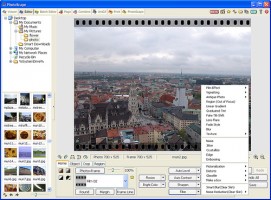
What is it? This free piece of software offers some basic editing, including colour adjustment, white balance editing, adding text, cropping and filters. The layout and manner in which the tools are selected (drop-down menus rather than icons) seems a touch archaic, it’s handy to use as a converter and photo-editor.
System requirements: PC or Mac