




We explain the various terms related to the connections on your digital camera, such as USB port, flash sync, mic, AV out, and HDMI
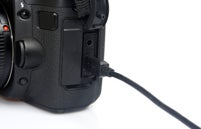
USB
A USB port is standard on compacts and DSLRs, but compacts tend to feature micro USB ports while DSLRs sport mini USB types. Some manufacturers have their own types that require a specific cable. The current system is USB 2.0, though this is set to be slowly replaced by USB 3.0.
Flash Sync
Found on mid-range and professional cameras, a flash sync port allows you to connect your camera to external lighting sources. Should your camera not feature one, you can buy a hotshoe-mounted device which will essentially act as the port itself.
Mic
Certain video-recording cameras can also accept external microphones. This allows them to record stereo sound through a better microphone than the one located in-camera.
AV Out
A basic monitor output for your rear LCD screen (short for Audio Visual out), allowing you to display your menu and image review on a separate screen. This is often in the form of a 3.5mm jack, though may also be combined with the USB port.
HDMI
Outputs a high res digital signal from your camera – much like the AV out – which can be used to review your images, or videos on