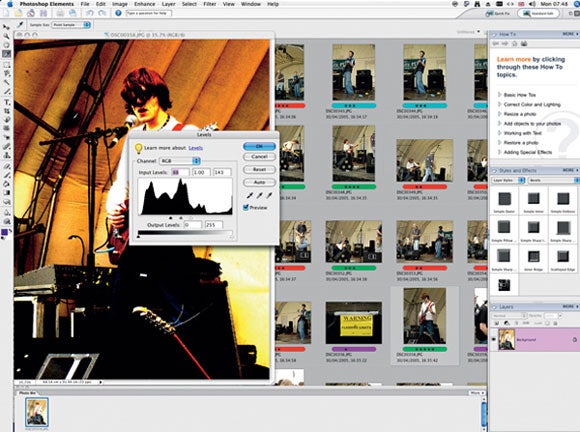
 Even if you take immense care with the camera, it’s still possible to find specks, especially after you’ve used it a lot. Also, if scanning old stills, it’s common to encounter not only specks, but scratches too. There are, however, powerful software tools that can be used to repair digitised images reasonably quickly and without introducing too many unwelcome artefacts.
Adobe’s Photoshop Elements is one such photo-retouching suite and is very effective for sorting out minor defects, thanks in part to its Dust & Scratches filter, but mainly thanks to the Healing Brushes. They’re capable of masking major flaws, if used with care. Let’s see how to spot the level of contamination in a photo and how both the Spot Healing Brush and the Healing Brush can be employed to clean things up.
Find that dust !
1. Access Levels
Here’s a shot from a compact camera (below) genuinely afflicted by an internal dust mote. The speck is hard to see, but it’s there, as a major Levels tweak in Photoshop Elements 4.0 will reveal.
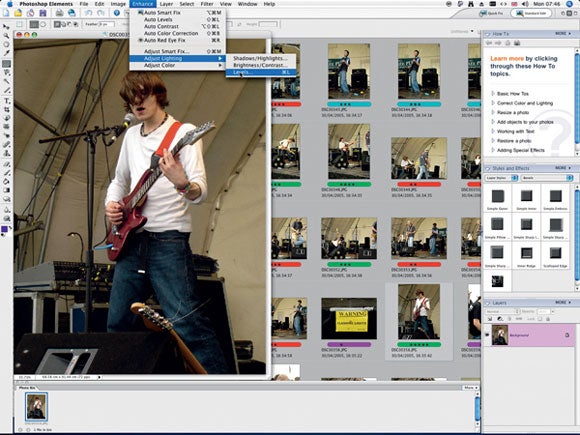
Go to your image editor’s Levels dialogue to make the adjustment.
We’re going to boost the contrast of the image by a hefty amount in order to make the speck show up. Pull the right-hand handle beneath the Levels histogram to the left to increase the brightness of the image, then grab the left handle and drag it to the right.
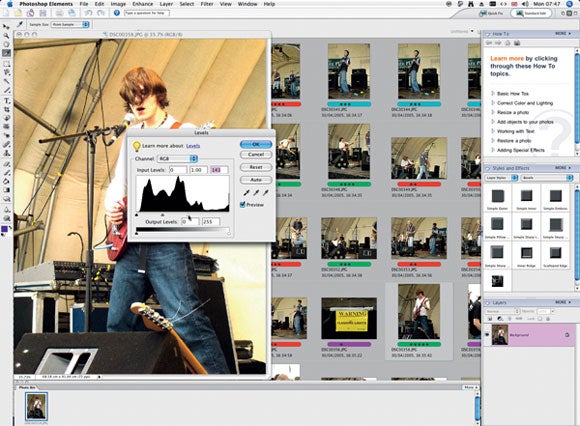
This is quite an extreme example of contamination, which now shows up very clearly thanks to our contrast adjustment. You can see the black blob against the marquee’s scaffolding. To test for dust in your camera, take a shot of some white card and try the same contrast-boosting ruse.