





Branding_print

Navigation


Backwards USM for Better Contrast

  • Monday, 8 December 2008
  • Philip Andrews
  • 0 Comments


Backwards USM

Backwards USM

want to add better contrast to a flat image?


Software:
Photoshop Elements, Photoshop

Skills learnt: Using the Unsharp mask filter to increase the contrast of dull images

Time: 20 mins

Most digital photographers have used the Unsharp Mask filter as a way to add some crispness to photographs 
that are a little soft. In another application this feature can be used to add some local contrast to flat images in much the same way that multi-contrast printing provides a boost to black & white prints.

The trick with this technique is to forget the way that you have been using the feature. Instead of selecting a high amount and low radius setting, you do the opposite. You drag the amount downwards and the radius upwards. This produces a change in local contrast rather than a sharpening of individual pixels. To use the technique as part of your standard enhancement process you would adjust highlight and shadow points to set the contrast of the whole picture first, then employ the Unsharp Mask filter to increase the local contrast and then use the filter a second time, with different settings, to increase the photograph’s sharpness. With the aid of a layer mask these changes can even be applied to specific parts of a photo.

The Adjust Sharpness filter in Photoshop Elements, or Photoshop’s own Smart Sharpen filter, also contain Amount and Radius sliders which can be employed to produce similar contrast-changing effects.

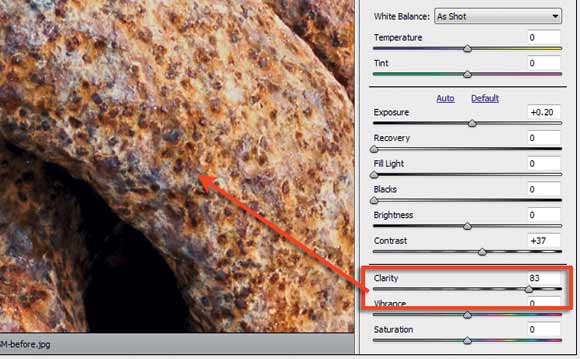
Other Software: Clarity Slide
The Clarity slider in both Lightroom and Adobe Camera Raw provides a similar local contrast adjustment that you can obtain with the techniques described here.


This article has more pages:

Share this article

email this to a friend

IPC Media Limited, owner of whatdigitalcamera.co.uk, will collect this information solely to process your request.

  • Bookmark
  • Print
  • Comment

Click on a link below to share this article with your favourite link sharing site


Rate this Article

Rate this content

0 stars

0 Votes

Current Rating


Reader comments

Add your comments

No comments have been added yet. Be the first by adding yours below...

Add your comments

Please note that we review all comments before they will appear on our site.

IPC Media Limited, owner of whatdigitalcamera.co.uk, will collect your personal information solely to process your request.

Back to top

What Digital Camera magazine

What's in this issue?

August Cover

What Digital Camera August 2009 Issue

What's In The August Issue? Lets take a look...

Subscribe

Save up to 30%

Subscribe

/


Latest Competitions

PaintShop Pro X2

WIN! A Corel software bundle

Name the camera to win a Corel software bundle

Enter now...


White Collapsible

WIN! A Lastolite collapsible background worth £165!

Answer these questions correctly from this...

Enter now...


More Competitions


Poll

Take part in our poll

What software do you use for editing?

Poll

  • Adobe Photoshop (31%)
  • Adobe Photoshop Elements (17%)
  • Corel Paint Shop Pro (10%)
  • GIMP (3%)
  • Adobe Lightroom (0%)
  • Apple Aperture (3%)
  • Google Picasa (21%)
  • Other (14%)

It may take 15 minutes for the system to update.

See all polls..