




Producing Photos That Really Sell!
The world’s largest online marketplace, eBay has revolutionised the way we can buy and sell possessions. Never before has it been so easy to get a sales pitch out to such a massive audience than via this online sales room and, as with most advertising, the images you use with your listing play a key role in your item’s saleability and the price it’ll fetch. So, to help you create photos that truly sell, over the next few pages you’ll discover the shooting techniques that’ll help send bidders into a spending frenzy!
Our eBay Online Auction
Throughout this project we’ve used the example of a fictional seller promoting the auction of a Lensbaby 2. But whether you’re selling a lens, a lamp or even some lederhosen, you’ll find that the shooting and editing techniques covered will apply equally well to all your eBay items!
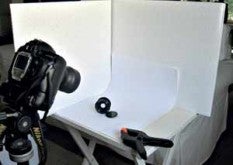 Setting Up Your eBay Shoot
The perfect table-top set-up for lighting your eBay item will produce enough soft diffused lighting from above and to one side that skims across the product for the photographer to use a high-aperture setting to capture the photo. This can be achieved as simply as placing a piece of curved white card on a table next to an open window. The object can then be placed carefully on the card and a white reflector positioned opposite the window to fill in the shadow areas.
Alternatively, a flash head or tungsten spotlight can be diffused through a white umbrella or reflected out of a silvered one towards the object. The shadows are again filled in using a white reflector. For cameras with hotshoe flash, a simple action of swivelling the flash upwards and then pointing it away from the object will allow you to bounce the light off a carefully positioned reflector simulating the flattering effects of soft window light.