




 On many cameras, especially SLR models, there is the facility to adjust the shutter speed. Far from being irrelevant – after all, it’s all too easy to set the camera to auto and let it get on with choosing the shutter and aperture settings – the shutter can create effects that will add dynamism to your pictures. On most cameras with this facility, the shutter ranges from about 1 second up to 1/1000th second; at the very top of the range, shutter speeds can vary from 30 seconds up to 1/8000th second.
On the camera there may be another setting, B, which stands for ‘bulb’. If you set the shutter dial to this, the shutter will remain open for as long as the shutter release button is depressed. Thus very long exposures can be taken. However, when using this setting with digital cameras, you need to be careful with any areas of extremely bright light, as these can do permanent damage to the sensor.
Creating Movement
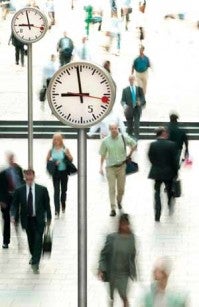
I took this shot for a recruitment agency to illustrate the rat race. I chose a viewpoint above the platform and, with the camera on a tripod, I waited for the rush hour train to arrive. I set the shutter at 1/8sec and took a series of shots as the commuters disembarked. At this speed they are distinguishable as people, but blurred, giving a sense of great movement as they appear to scurry off to work!
 Top Tip
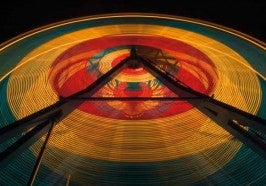
Fairgrounds make great subjects for slow shutter speed shots. The mass of colourful, moving lights record as blurred streaks of colour. Ferris wheels are a particular favourite. Experiment with different shutter speed settings for the best results.
 Night time
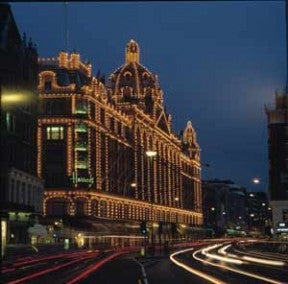
A slow shutter speed is also preferable when shooting at night. Look at this picture of Harrods, the famous store in London. The foreground of the shot is taken up by the road that passes in front of the shop. I could have waited until later when there would have been hardly any traffic. However, I have used this to my advantage by recording the trails of light from the passing vehicles to fill up what would otherwise have been a dead area. In this case I used a shutter speed of one second.

Slow sync flash
Another benefit of using a slow shutter speed is when you are using flash. If you combine a situation where there is a certain amount of ambient light with flash and a shutter speed of 1/15 or 1/8sec, your subject will be mainly sharp, but the surrounding area of the background will have a degree of ‘movement’ in it, due to camera shake, as is the case here of a participant in the carnival at Rio.