There are those who say that the only true exposure tool in photography is the shutter. Exposure could be defined as the length of time that film or a digital sensor is exposed to light. The aperture determines how much light is let in during that exposure. Of course, broader photographic theory explains that exposure is a combination of aperture and shutter speed.
So what exactly is the shutter, and what does the term shutter speed mean? The shutter is a gate inside the camera body between the sensor and mirror. It can usually be seen when the lens is detached from the body and the mirror raised.
The shutter consists of a front and rear metal curtain. It’s operated by the shutter release button, often lazily referred to as the shutter button or even just the shutter – which can be confusing. When the button is pressed the front curtain begins to move to expose the image, closely followed by the second, or rear curtain in the same direction. This creates a gap, that travels at a constant speed across the sensor to expose the entire frame. Shutter speed refers to the amount of time the shutter is open, between the first and second curtain, thus exposing the image. Typically, the length of time the shutter is fully open amounts to mere fractions of a second, and hence they are expressed as such, for example 1/60 sec, 1/500sec and so on. Occasionally you may need to make longer exposures of several seconds, or even minutes. The smaller the fraction, the shorter the exposure and vice versa. So for a one second exposure, the first curtain opens fully and a second later the second curtain follows it to close the shutter.
Just like the aperture, each ‘stop’ between shutter speeds – selected via an on-camera dial – doubles or halves the exposure, so 1/125sec is half the time of 1/60sec, reducing the exposure by 1EV (Exposure Value) or one stop; while 1/30sec is double the time of 1/60sec so increases the exposure by 1EV or one stop. Modern cameras also have half or third stop increments, ensuring more accurate exposure.
The length of time the shutter remains open has an effect on the image. Short (or fast) shutter speeds stop action mid-track, while long (or slow) shutter speeds will blur any movement.
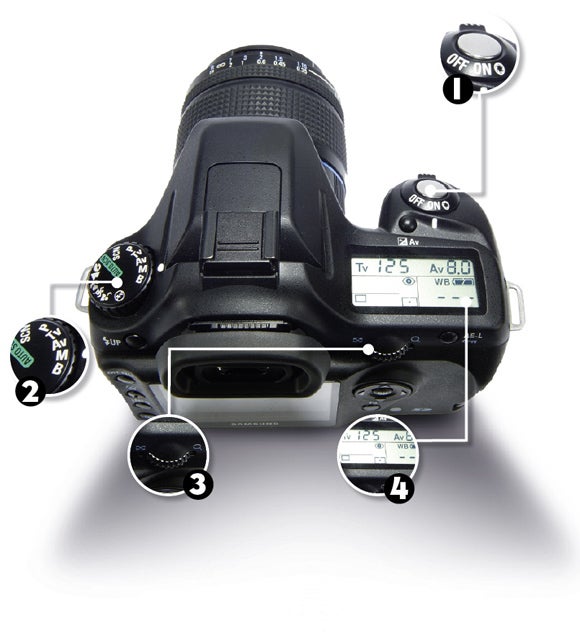
Typical DSLR Shutter Controls
1: Shutter Release Button
Aside from operating the shutter mechanism, this button also activates the cameras focus, metering and white balance.
2: Mode Dial
The best mode to choose is Shutter Priority AE, marked as S or TV (for Time Value). Alternatively Manual (M) allows control of both shutter speed and aperture.
3: Command Dial
Situated at the back or near the shutter release button, the command dial can be used to choose the speed we wish to use.
4: LCD Screen
Amongst the information displayed on the screen is the shutter speed. Usually only the denominator figure is shown, ie 125=1/125sec.