




We take a look at a range of the best Raw photo editing software currently on the market
Many cameras, not just high-end DSLRs, give you the opportunity to shoot in raw format. It’s something that we generally always recommend for most photographers.
When shooting, capturing Raw files ensures that you can maintain greater control of your final images. Raw doesn’t just permit a greater scope for post-production due to the higher amount of data in the file, but permits sharpness and image noise control that, if shooting in JPEG-only mode for example, may otherwise be compromised given the camera’s often limited internal processing.
The process of editing Raw files is often viewed as a laborious and time-consuming one, although if you pick the right photo editing software it needn’t be. We’ve picked a few of the best that can hopefully make your life easier.
Best raw photo editing software 2016
Adobe Photoshop Lightroom CC
Mac & PC – part of a Adobe CC package (£8.57/month)
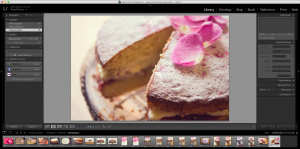
Adobe Photoshop Lightroom is available now as part of Adobe’s Creative Cloud package, so you get it along with full Photoshop for a fee each month.
This means that you should see incremental upgrades to the software which are available as a free update so long as you keep paying for your subscription. It was last updated in October 2015 with some extra tools which further cement Lightroom’s position as the number one image editing and organisation tool for both professionals and hobbyists.
You can edit Raw photos within the software itself through a selection of sliders which are similar to Adobe Camera Raw – so basically you get rid of the two-step process that occurs with normal Photoshop.
Some highlights from the latest version include the ability to adjust haze in specific areas of a photograph, and a bunch of improvements made to Lightroom’s mobile options across Android and iOS. There’s also Lightroom on the web which gives you a few of the editing tools within a web browser – ideal if you find yourself on a different computer than your own but need to make some quick changes.
Best Raw Photo Editing Software for: Complete Raw photo editing and organisation
Apple Photos
Mac only – Free
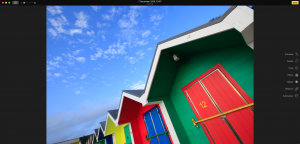
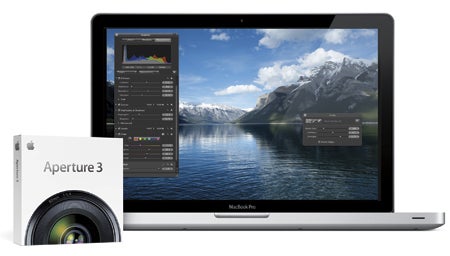
Apple users used to have make a decision between iPhoto and Aperture 3 – the latter being paid for. The company has now scrapped both, and replaced them with the free “Photos” software.
On the one hand, free is always a bonus, but many complain that the new Photos software doesn’t have anywhere near the amount of advanced options as the Aperture software offered.
Photos can import both JPEG and raw format files. Images important to Photos can be uploaded automatically to the Cloud – you’re going to need a large payment plan if you want to store your raw files up there. Alternatively, you can store your raw files in different folders outside of Photos, say on an external hard drive.
The edits you can do are quite lightweight, which is fine for making a few quick adjustments, but you’ll probably want to invest in some more advanced software if you find you’re shooting often.
Best Raw Photo Editing Software for: Native apple integration and quick edits
DxO Optics Pro 10
Mac & PC – £99 (Essential Edition) / £159 (Elite Edition)
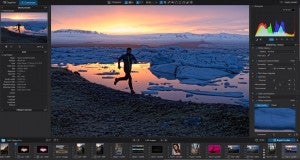
In terms of a complete Raw editing solution, it’s hard to better DxO Optics pro. Not only does the software offer extensive tools to aid the Raw conversion process, but it also boasts a range of high-end tools to aid the improvement of image quality.
DxO Optics also features a range of tailored lens correction plug-ins which recognise the lens used and correct the images accordingly for any known flaws.
The latest version includes “PRIME denoising technology” which is designed to reduce the amount of noise in a shot, without smoothing out detail. Those who like to shoot in low light should find this particularly beneficial. The software is also 4x faster than the previous version.
DxO ClearView is another new feature – this is designed to remove haze, often the scourge of landscape photography. Sharpness can also be improved with a new Lens softness tool.
Best Raw Photo Editing Software for: Advanced lens correction and editing
Corel AfterShot Pro 2
Mac, PC & Linux – £57.99
AfterShot Pro is quite similar to Adobe’s Lightroom software in that it not only offers advanced Raw editing functionality, but also serves as a sophisticated photo management tool, and one that won’t break the bank (especially if you don’t want an ongoing subscription).
The latest version offers precise control over various parameters including colour balance, sharpening and noise reduction, as well as lens-distortion correction. One of the things it does really well is allow you to edit only certain parts of an image, which is a little more flexible than the equivalent Lightroom function.
Best Raw Photo Editing Software for: Simplicity and cross-OS support
Phase One Capture One Pro 9
Mac & PC – £234 (£86.40 if you already have Capture One Pro 7 or 8)
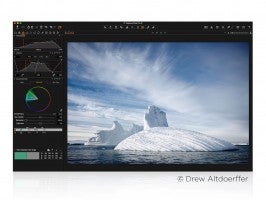
A long-standing favourite with studio photographers thanks to its tethered shooting capability, Capture One Pro is often aassociated with medium format users. As pro as it is, however, there are many features for easy organisation and top-notch post-processing.
If you’re looking for a solution that offers a professional level of support and integration in to the work flow, Capture One Pro 9 could well be worthy of consideration.
Best Raw Photo Editing Software for: Professional photographers